
Google Analytics, Search Console and your Business Profile, set up for you
Google has approved our connection, so every customer can now connect their Google account once from the dashboard. In about a minute we set up Google Analytics and Search Console for each website, and your Google reviews can show on your site. It all stays on your own Google account, at no extra cost.

In short
- Google has approved our connection, so Connect Google is open to every customer, on every plan, at no extra cost.
- In about a minute we set up Google Analytics and Search Console for each live site and send Google your sitemap.
- Your dashboard then shows visitors, enquiries, clicks from Google and the searches that found you.
- Your Google reviews can appear on your website, and we can help you create a Business Profile if you have none.
- It all sits on your own Google account, and stays there if you disconnect.
Google Analytics for small business, minus the afternoon
Most guides to Google Analytics for small business owners begin with an afternoon of codes, tags and settings pages. From today you can skip all of it. Google has approved British Web Designs' connection to Google Analytics, Google Search Console and Google Business Profile, so any customer can connect their Google account from the dashboard and let us do the setting up.
Until now this was open to a first group of customers while Google reviewed the connection. That review is done.
What one connection sets up for each site
Press Connect Google on the Analytics page of your dashboard, or on any site's page, and sign in. Google shows you exactly what we are asking to do. Say yes, and for each of your live websites we:
- create a Google Analytics 4 property named after the site, on your own Analytics account
- add a data stream for the site's address and put its measurement ID on the site for you, so it starts counting from the next page anyone opens
- prove to Google that the site is yours, with a verification tag we add to the site
- add the site to Google Search Console and submit its sitemap, the list of every page, so Google knows what to look at
Nobody copies a code between browser tabs, and nothing on your site needs rebuilding. After that, a weekly check makes sure Google holds the sitemap for the address your site answers on today, which matters when a site moves from its testing address to your own domain.
On a property we create, we also switch on Google's enhanced measurement and count each enquiry from your contact form as a key event, plus each sale or paid booking if your site takes payments. So it records what matters from the first day, not only page views.
Already have Google Analytics, or none at all
You decide what happens to each site, on a page called Which sites should Google look after? For every live site you pick one of three:
- Create a new property: we set everything up as above.
- Use one I already have: we link the property you use now, keep its data stream for that address if it has one (so nothing is counted twice), and add the tag. It is your property, so we leave its settings alone unless you ask.
- Leave this site alone: we set nothing up and read no figures, and any tag it already has stays put.
If your Google account has never used Analytics, you will see Create my Google Analytics account. Google asks you to accept its terms on its own page, sends you back to us, and every site you chose a new property for is set up in it. Websites you add later are set up when they go live, unless you untick that option.
On your dashboard
Every site, on one page
The Analytics page adds up all your websites over 7 days, 30 days, 90 days or 12 months, each figure compared with the period before. Below the chart: where visitors came from, your most-read pages, what people searched for, and a row for each site saying what it is connected to.
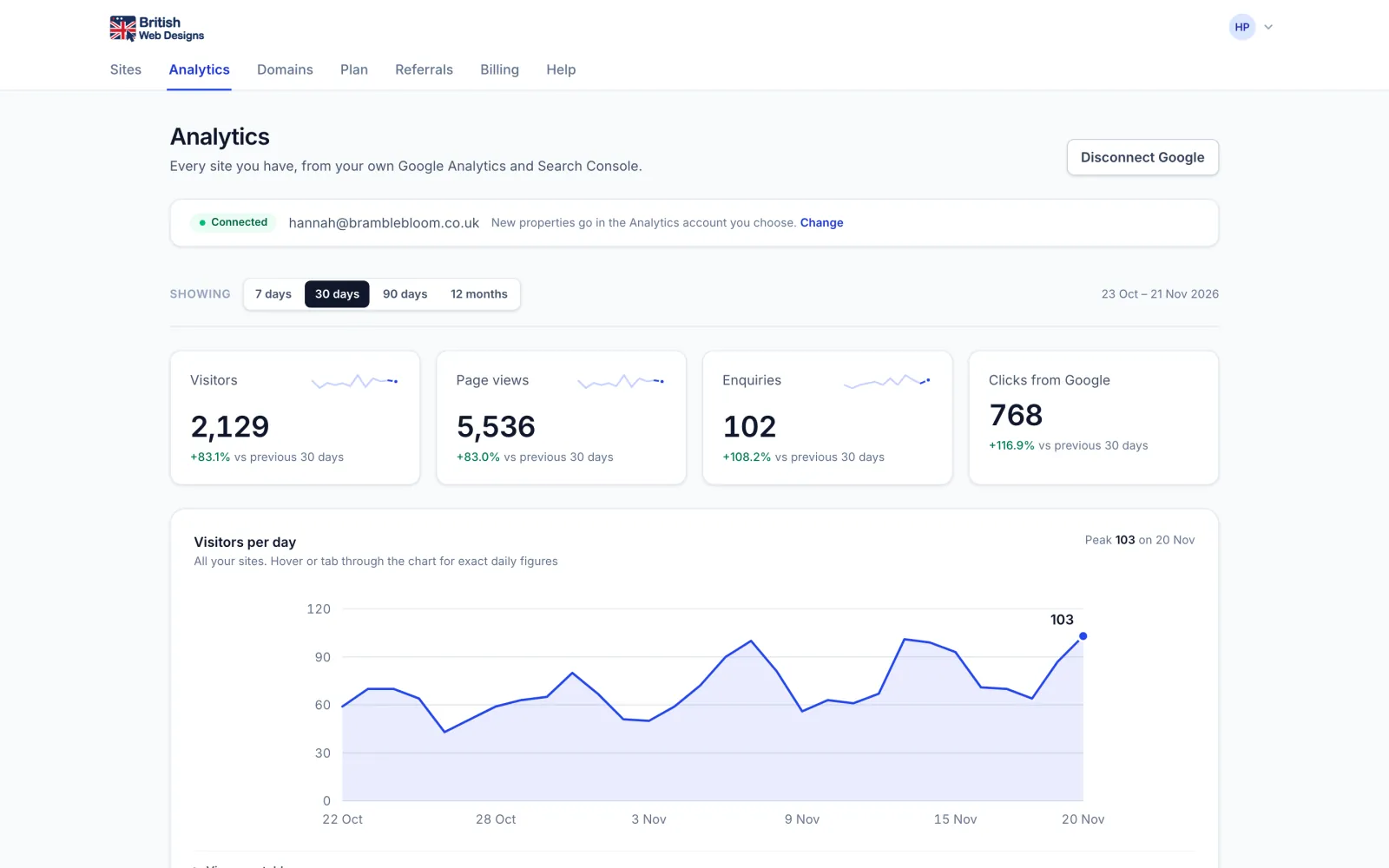
The figures, in plain English
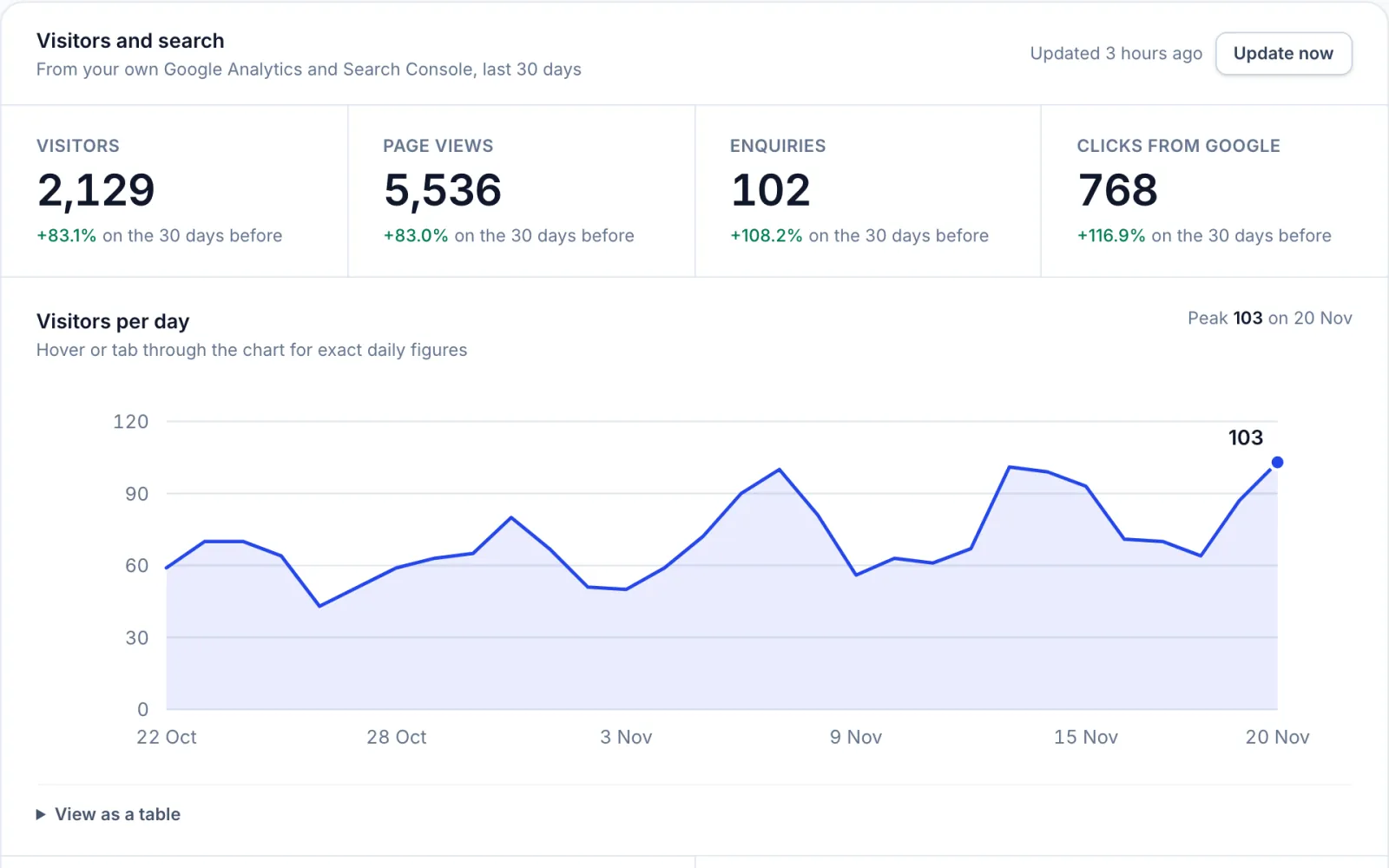
Each site's page on your dashboard also gets its own Visitors and search panel:
- Visitors: people, not visits, so a customer who looks twice counts once
- Page views: how many pages they opened
- Enquiries: messages sent through your contact form, counted by your site itself, so they are right even if you never connect Google
- Clicks from Google: clicks from Google Search, with your average position in the results
The figures refresh every three hours, or press Update now. Search Console takes a few days to report on a new site, and until a site has something real to show, we show no figures at all rather than placeholders.
On each site's page
Visitors and search, for one website
The same figures for one website, each compared with the 30 days before.
Your Google reviews, on your website
The same connection can read your Google Business Profile, the free listing that puts you on Google Maps. Connect the Google account that manages it (the one you use for Analytics, or a different one). We match each website to its profile, or ask you to pick when we cannot tell.
Your reviews then appear on your website with your star rating, brought up to date every week. If your site has nowhere to show them yet, we ask for a change ourselves that adds a reviews section to your home page. Like every change, it goes on your staging copy first and only goes live when you approve it.
No Google Business Profile yet
Plenty of small businesses never set one up, or set one up years ago on an email address nobody can get into. If we find no profile for your website, you will see Create my Google Business Profile. We fill in what we know from your website, such as your name, address, phone number and opening hours, and you choose a category from Google's list and write a short description.
First, we search Google for your business, so you never end up with two listings. If one exists that someone else manages, perhaps a past employee or an old agency, we show it with Request access to this listing instead of making a duplicate. If you go to your customers rather than them coming to you, your address is used for verification and not shown on Google.
Google then checks the business is really yours. Depending on the business, it offers a postcard with a code, a phone call, a text, an email or sometimes a video. Most of these you can finish from our page; for a video, we explain how to finish in Google. Google decides the methods and how long it takes, and nothing shows on Google until it is done.
It stays yours
Everything we set up sits on your own Google account: the Analytics property and its history, your Search Console and your Business Profile. We only use the connection to set these up and to show your figures and reviews. Disconnect from the same page whenever you like, and it all stays exactly where it is, because it was never ours to keep.
Nothing extra to pay
Connecting Google costs nothing on any plan. Not a customer yet? Use the code BLACKFRIDAY before midnight on Monday 30 November and Starter is £11.99 a month for as long as you keep the plan.
Questions people ask
Does Google Analytics cost anything?
The standard version of Google Analytics is free from Google, and so is Search Console. Connecting them through us costs nothing extra on any plan.
I already use Google Analytics. Will I lose my history?
No. Choose **Use one I already have** and we link the property you have now. We do not change its settings unless you ask.
Do I need a cookie banner for Google Analytics?
Your site already shows a cookie banner when it uses analytics, and Google Analytics only loads for visitors who accept it. Nothing extra for you to do.
Read next
More on being found on Google.
Connect Google from your dashboard
Already a customer? Open Analytics on your dashboard and press Connect Google. New here? Tell us about your business and we build your website first; connecting Google then takes about a minute.